

01
What DMARC does
DMARC uses alignment with the visible From domain and a passing SPF or DKIM check. Its policy requests how receivers handle failures.
DMARC requests how receivers handle mail that fails domain authentication and alignment. Review your published policy.
Free for AwareX client employees and anyone who needs a quick check. No sign-up required.
How to check, verify, and actDNS queried via Cloudflare. We don’t store your input.
Review the domain's published email-authentication policy. Your email administrator decides how it should be enforced.
Enter the domain you want to review, such as example.com, without a page path.
Select Check records. The tool requests the public DNS records through Cloudflare.
Review the DMARC entries with your DNS or email administrator before making changes.
Enter the work email domain without _dmarc, because this checker adds the prefix.
Look for v=DMARC1 and p= in the returned policy.
Confirm the policy and reporting addresses with IT.
Ask IT to review SPF/DKIM alignment and reports before changing enforcement. Do not switch to reject based on this lookup alone.
A returned record is not a security verdict. Missing records can reflect configuration, propagation, or a lookup issue.
DMARC combines domain alignment with SPF or DKIM authentication. Publishing a policy alone does not confirm that legitimate senders are aligned or that every receiver will enforce it.
DMARC uses alignment with the visible From domain and a passing SPF or DKIM check. Its policy requests how receivers handle failures.
A p=none policy collects reports without affecting delivery, a safe first step toward enforcement.
A p=reject policy requests rejection of failing messages. Confirm legitimate senders are aligned first; receivers may apply local policies.
These DMARC specification facts explain policy and alignment. They describe the standard, not your domain's protection level or a measurement of phishing risk.
The published policy can request none, quarantine, or reject. Receiving systems may still apply their own handling policies.
IETF · RFC 7489, section 6.3Strict alignment requires an exact domain match. Relaxed alignment permits a match at the organizational domain level.
IETF · RFC 7489, section 3.1After unrelated TXT entries are excluded, multiple DMARC records end policy discovery without applying DMARC processing.
IETF · RFC 7489, section 6.6.3DMARC helps receivers handle mail that fails domain authentication and alignment. It does not judge the intent of an authenticated message. AwareX separately prepares employees to recognize and report convincing requests.
Review policy and alignment with your administrator. This lookup does not test message delivery, receiver enforcement, or your employees' responses.
Lookalike addresses, compromised accounts, SMS, calls, and deepfakes can reach employees regardless of the records returned by this check.
Separately, AwareX provides contextual simulations and learning that help teams pause, verify, and report. This lookup does not run or validate those activities.
AwareX is AI-powered human risk testing: it learns your business, runs realistic simulations across email, SMS, voice, QR codes, and deepfakes, and adapts learning to how your people respond.
See AwareX in Action - Book a demoThis free tool shows one signal. AwareX is a New Age Human Risk Management platform: five AI agents work together to test your people the way attackers would, and to turn every response into learning.
Learns your business from public context: departments, products, and tone, so every test is grounded in how your organization actually works.
Drafts and scores attack scenarios against your scope, the way a real attacker would plan them.
Writes on-brand emails, messages, and calls with realistic signatures and sender identities, ready for your review.
Compares predicted risk with how people actually respond, so the picture gets sharper after every wave.
Decides who needs practice next and routes learning to the people and teams that need it most.
A DMARC Record Checker result is one piece of the picture. Explore how AwareX connects realistic simulations, learning, and reporting for your organization.
DMARC requests how receivers handle mail that fails domain authentication and alignment. Review your published policy. This tool queries public DNS through Cloudflare and displays the DMARC records returned for your domain. Use the results to review your configuration; finding a record does not by itself confirm that your domain is secure.
Where we test
Identify, Measure, Prioritize, Reduce, Optimize, Validate, and Evaluate. AI connects business context, employee responses, and targeted learning to inform each next test.
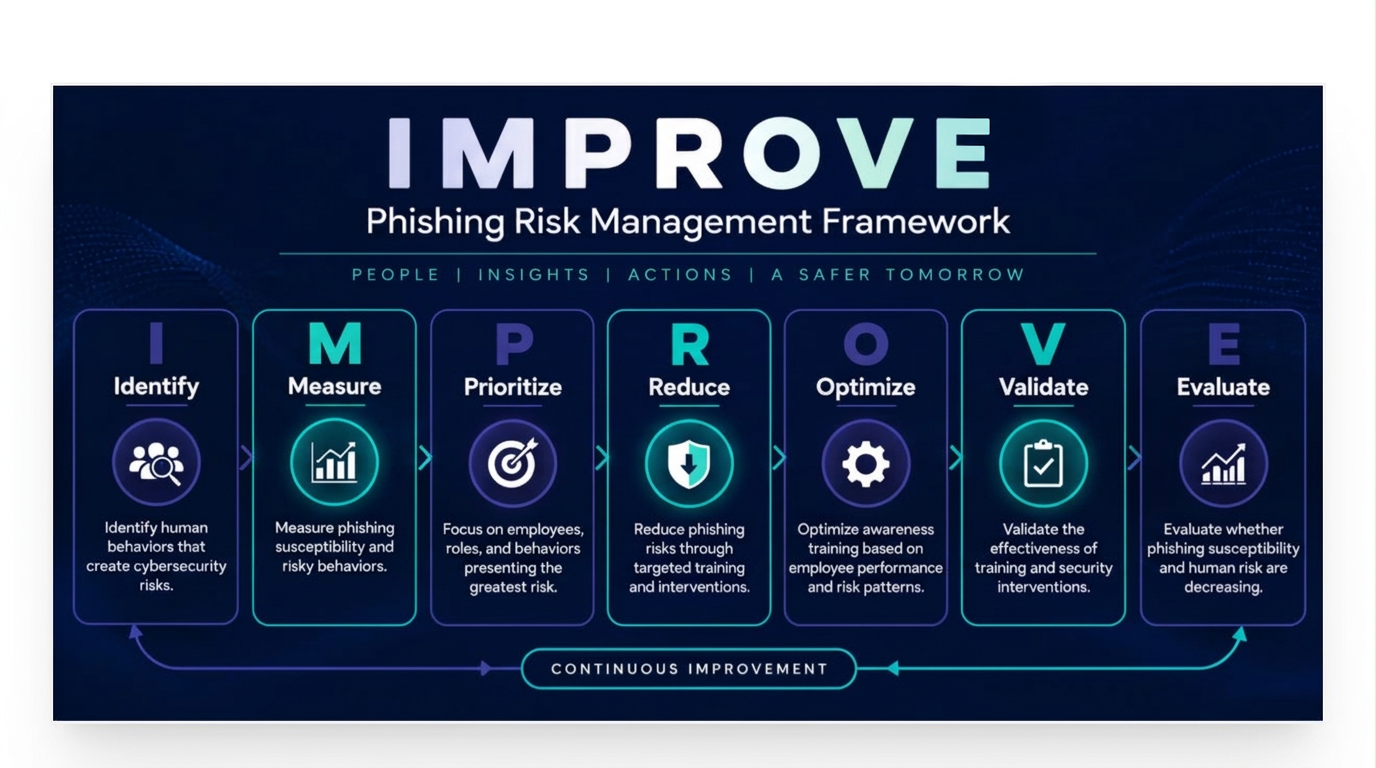
A free check tells you where you stand today. A partnership with AwareX turns that snapshot into a continuous, AI-powered program.
Simulations are written from your sector, your roles, and current events, so every test feels real to the person receiving it.
Every response informs the next test and the lesson that follows it, so training adapts as your risk changes.
Dashboards, records, and compliance alignment give leadership and auditors a clear picture of progress.
Setup, campaign planning, and ongoing optimization from a team that runs these programs every day.
Free access, safe follow-up, and answers specific to this checker.
Yes. Every AwareX free tool is free to use, and you can run as many checks as you need.
No. There is no account, no sign-up, and nothing to install. Open the page, run the check, and read the result.
Share the result with your DNS or email administrator, close any gaps they identify against your provider’s recommended setup, and re-run the check to confirm the change.
DMARC requires at least one passing, aligned SPF or DKIM result. It connects authentication to the domain in the visible From address. This tool displays the policy published at _dmarc.
p=none requests monitoring without a DMARC delivery action. p=quarantine asks receivers to treat failing mail as suspicious. p=reject asks them to reject it. Receivers may apply their own policies.
Review aggregate reports and authenticate every legitimate sender first. Start with monitoring if you are unsure, then increase enforcement carefully to avoid disrupting legitimate mail.
rua specifies where participating receivers send aggregate reports about authentication and alignment. Publishing an address here does not mean this checker collects or displays those reports.