
Phish Reporter Button
When a suspicious email goes unreported, the security team learns about it late, or never. AwareX gives employees a familiar inbox route to raise the concern.
Explore the approachA threat noticed but not reported leaves the team in the dark.
A suspicious email left unreported keeps security teams in the dark. AwareX gives employees a familiar inbox route to raise the concern.
An employee notices an unverified venue invoice and reports the email through the organization’s approved reporting process instead of forwarding it around the team.
Fictional workplace example, not a live attack or measured customer result.
- 01 / WHAT ROUTINE TRAINING MISSES
The lesson stops at ‘do not click.’
An unclear reporting route can leave people ignoring a message or forwarding it around without reaching the right team.
- 02 / WHEN THE REQUEST FEELS REAL
The same request can keep reaching colleagues.
Delayed reporting can slow the security team’s awareness of a suspicious message that others may also receive.
- 03 / WHERE AWAREX CHANGES THE REHEARSAL
Give the pause a clear next action.
AwareX’s Phish Reporter Button provides an inbox reporting route. Confirm supported clients, triage, and feedback options in your demo.
Routine compliance training vs. AwareX
Compliance learning establishes a foundation. AwareX puts AI behind the action: it connects a suspicious message to the right reporting route and the feedback that follows.
| What matters | Routine compliance training | AwareX approach |
|---|---|---|
| Starting point | A scheduled course built around policies and general awareness. | AI studies your approved business context first, so the first test reflects how you work. |
| Workplace relevance | The same broad examples for every responsibility. | AI drafts role-specific versions for finance, HR, IT, and leadership; your team approves each. |
| What people practice | Recognizing terms and selecting answers in a lesson. | AI adapts the messages people meet and the guidance they receive. |
| Follow-through | Completion often becomes the finish line; reinforcement is rarely built in. | AI tracks how each message is handled and drafts the feedback that closes the loop. |
| What success means | Attendance, course completion, and assessment scores. | Concerns raised through the approved route, with AI spotting the pattern organization-wide. |
This compares a completion-focused training approach, not every training provider. AI output is reviewed by your team before release, and capabilities and scope are confirmed in your demo. Training does not guarantee attack prevention, compliance, or certification.
From recognizing a message to rehearsing a response
Can the employee report the suspicious email through the approved inbox process?
Rehearse the decisionExplain the missed cuePractice again
What is Phish Reporter Button?
One button in the inbox that turns suspicion into a report: the employee flags the email, the security team gets a triaged report, and the habit gets recognized.
Report from the inbox
Reporting stays where the email already is, so the alternative to forwarding it around the team is one click away.
Immediate feedback
Reporters learn what they caught. Recognition is what turns a one-off report into a habit.
A signal in the risk profile
Reporting behavior feeds each person's profile, so coaching can build on the habit instead of starting from zero.
An employee notices an unverified venue invoice and reports the email through the organization’s approved reporting process instead of forwarding it around the team.
Mailbox platforms and triage workflows in scope are confirmed with your team in a demo.
How AwareX AI makes it more effective.
Reports flow straight to AwareX, where AI sorts the real threats from the simulations and coaches the reporter.
One click to report, AI does the triage.
- Scan the web
- Read the news
- Map the people
- Triage reports
- Send for approval
- Finance reported a supplier email
- HR reported a CV attachment
- IT reported an MFA prompt
Reported by AwareX
Well spotted: that was a simulation (+50 points)
AI sorted this report and drafted a thank-you note with the cue the employee spotted.
Triage · ready
Awaiting your approvalIllustrative example. Signals, names, and messages are not real customer data.
AI helps triage reported emails, grouping similar reports so the security team sees patterns instead of noise.
Reporters get immediate feedback on what they caught, recognition that reinforces the habit.
Reporting behavior becomes a signal in each person's risk profile, guiding future coaching.
AI proposes; people decide. Every scenario is reviewed and approved by your team before it reaches an employee.
Every answer changes the next test.
Each response is read as a signal, not filed away as a score. The AI engine moves each person one step up or down seven difficulty levels, so nobody meets a deepfake call before they can spot a fake invoice, and nobody stays on obvious spam that teaches them nothing.
- Reported it in time
The next test moves a step up the ramp: a more familiar sender, a tighter story, or a second channel arriving behind the first.
- Clicked, then raised it
The level holds. The lesson names the exact cue that was missed, and that cue returns in the next wave until it is recognized on sight.
- Missed it entirely
Coaching comes first, not embarrassment. The next test keeps the same theme with clearer warning signs, then rises again once the habit holds.
Adjustments belong to the person, not the whole company. Your team still reviews and approves every wave before it runs.
- Obvious phishing
- Realistic corporate
- Spear phishing
- Business email compromise
- Executive impersonation
- Multichannel story
- Deepfake + social engineering
Why it matters: a result only means something when you know how hard the test was.
From suspicious request to a safer response.
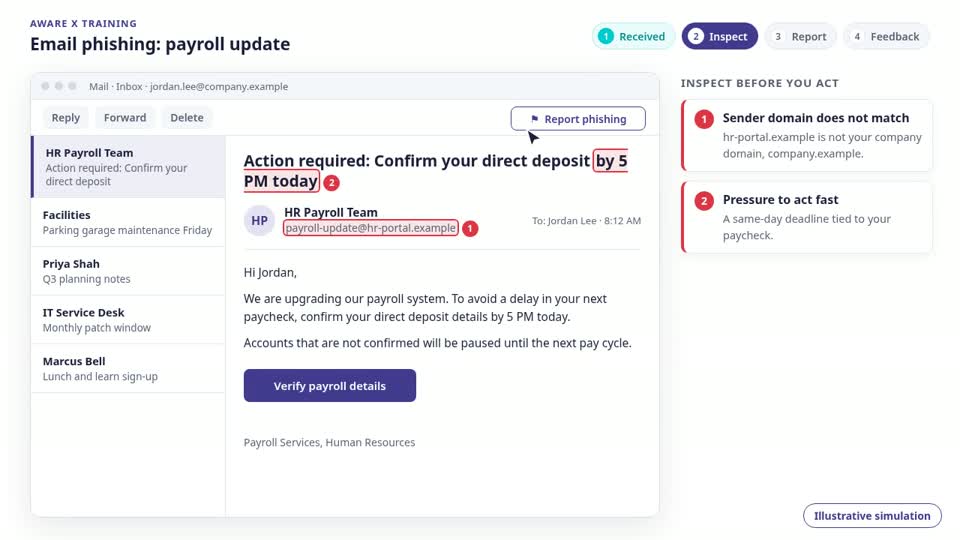
Phish Reporter Button, rehearsed through the decisions around a marketing offsite and a campaign plan.
- A realistic message lands in the flow of work.
- Each cue is inspected one by one, from the sender to the deadline.
- The safe response is rehearsed: report it, verify it, or ask.
Verify new bank details first.
Illustrative screens, not live product screenshots. Messages, identities, and destinations are fictional; no links, payments, approvals, or uploads are active. Confirm capabilities in a demo.
One check today.
A safer routine every day.
Include reporting in every fire drill. Practice noticing the cue and raising the concern, so avoiding a click is not the end of the exercise.
Explore the fire-drill approachCaptured platform preview. Figures are example data, not measured customer results.
- 01
A drill, not a checkbox
A signed policy fades within weeks. A rehearsed pause, verify, and report habit holds when a real message lands.
- 02
Practice where decisions happen
Short, contextual exercises arrive in the flow of work, in the channels your teams actually use, instead of a once-a-year course.
- 03
Learn, never blame
A miss is data for the next exercise, not a mark against a person. Repeated practice is what moves the numbers.
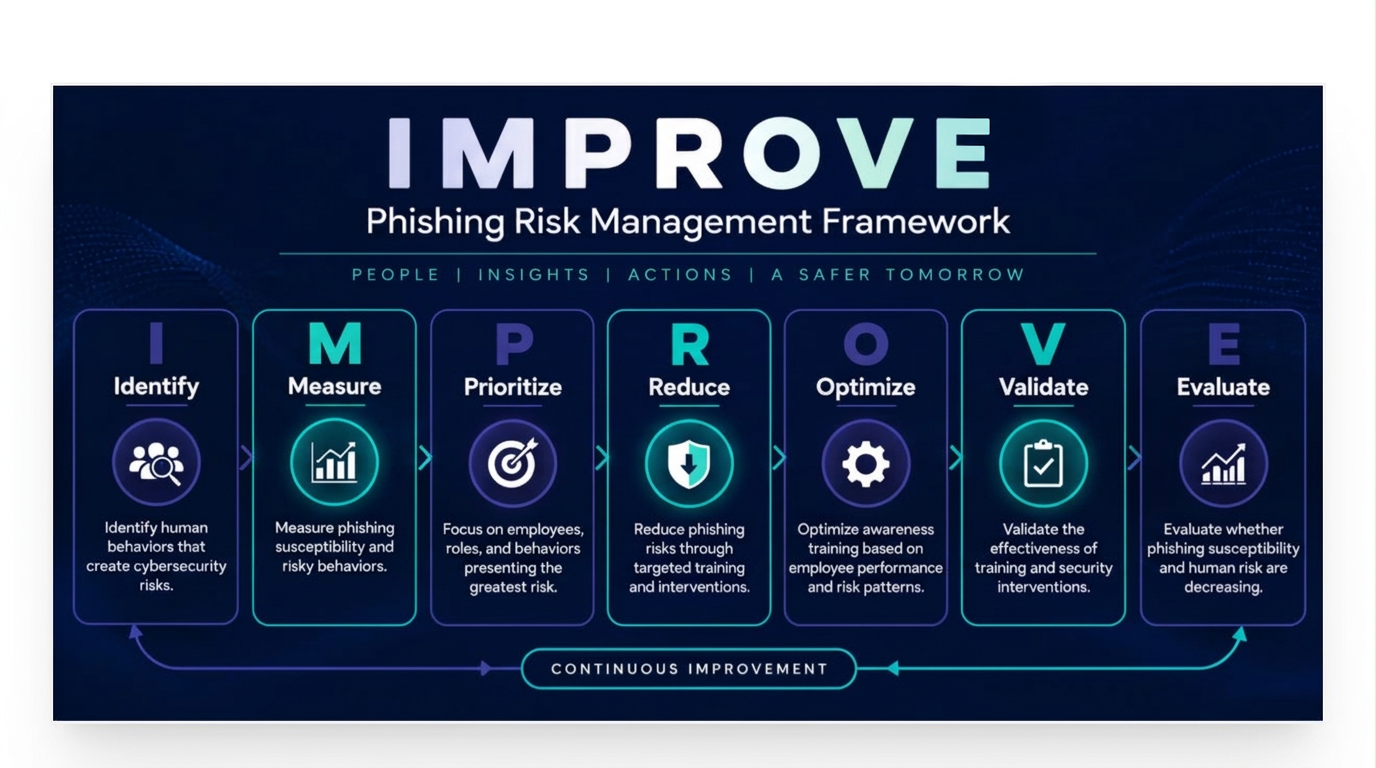
IMPROVE.
One continuous loop.
Identify, Measure, Prioritize, Reduce, Optimize, Validate, and Evaluate. AI connects business context, employee responses, and targeted learning to inform each next test.
Explore related solutions.
Clarity before
the next step.
What is a Phish Reporter Button?
A Phish Reporter Button gives employees a direct way to report suspicious emails from their inbox. It supports the organization’s approved reporting process so the security team can review a questionable message.
When should employees report a suspicious email?
Report an unexpected email that asks for credentials, payments, sensitive information, or an unusual action, even if you are not certain it is malicious. Follow your organization’s guidance and avoid interacting with suspicious links or attachments while deciding.
How does the AwareX Phish Reporter Button support awareness?
AwareX connects inbox reporting with the habit of escalating an unverified request rather than forwarding it around the team. Discuss deployment, feedback, and triage scope in a demo to confirm how it fits your email environment.
Does reporting a message prove it is phishing?
No. Reporting flags a message for review; it is not a verdict that the sender or content is malicious. Employees should report reasonable concerns, and the security team should investigate through the organization’s established process.
What should employees do if they clicked before reporting?
Report immediately and explain whether you entered information, downloaded a file, or approved access. Use the approved incident channel if additional action is needed. Do not hide the interaction or assume using the report button reverses it.
Can a reporting button replace email filtering or security-team review?
No. Reporting complements email protection, training, and incident response. Confirm compatibility, routing, and handling requirements with your team before deployment, and keep an alternative approved reporting channel available.