
What Is Spear Phishing?
Spear phishing is a phishing attack aimed at one specific person or team. Instead of a generic template sent to thousands, the attacker researches the target's role, responsibilities, and current activity, then writes a request that fits. That relevance is exactly what makes it dangerous.
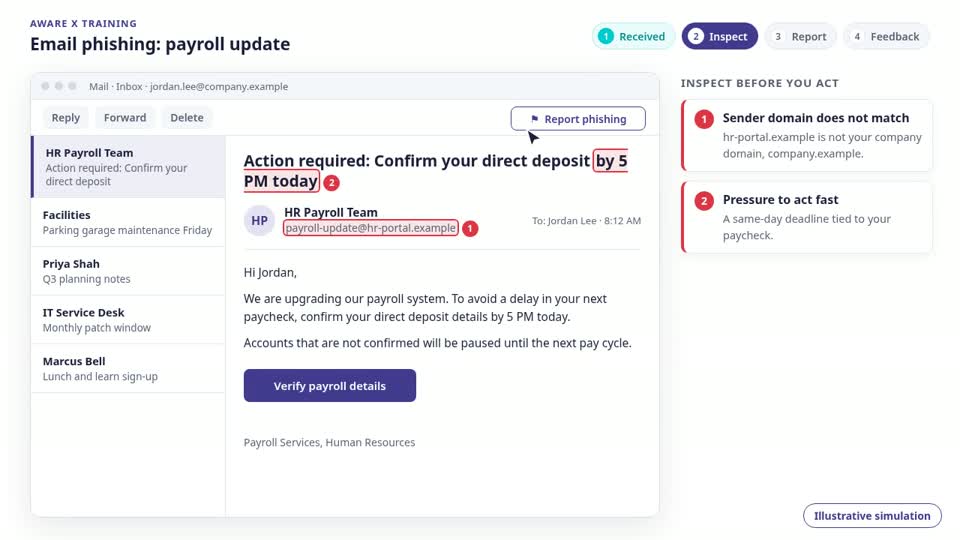
Examples of spear phishing
A spear phishing email only makes sense for the person who receives it:
- A finance employee receives a supplier invoice that matches a real event, with new bank details.
- An HR manager gets a candidate CV that carries a malicious attachment.
- An engineer receives a repository or security alert styled on the tools their team actually uses.
How to defend against it
Because the message fits the context, spotting it by eye is unreliable. The defence is a verification habit:
- Verify payment, access, and data requests through a known contact or an approved process, whatever the email says.
- Treat urgency and secrecy as warning signs, especially when a request bypasses normal approvals.
- Report suspicious messages instead of forwarding them to colleagues.
- Run spear phishing simulations so people rehearse the decision before a real attack arrives.
Clarity before
the next step.
What is spear phishing, and how does it work?
Spear phishing is a targeted phishing attack against a specific person or team. An attacker researches the recipient’s role, contacts, and business activity, then impersonates a trusted sender to request credentials, sensitive information, a payment, or another unsafe action. Accurate details make the request credible, but they do not prove it is legitimate.
What is the difference between phishing, spear phishing, and whaling?
Phishing is the broader category of deceptive messages designed to steal information or trigger an unsafe action. Spear phishing targets a particular person or team using tailored context, while broad phishing campaigns often reuse the same lure for many recipients. Whaling is spear phishing aimed at senior executives or other high-value decision-makers.
What are common examples of spear phishing emails at work?
Workplace examples include a fake supplier email asking Finance to change bank details, a candidate email sending HR a malicious resume attachment, and an IT impersonation asking an employee to sign in through a lookalike website. These are illustrative scenarios: the attacker matches the message to the recipient’s responsibilities so the request feels like routine work.
How can you recognize a spear phishing email if it looks legitimate?
Check the actual sender address and destination domain, not just the display name. Look for unexpected attachments, changed payment instructions, requests for credentials, and pressure to bypass approvals or keep a request secret. Correct grammar and familiar project details are not proof of authenticity. Verify sensitive requests through a known contact or an approved process outside the email.
What should you do if you receive or click a spear phishing email?
If you receive a suspicious email, do not reply, open attachments, or follow its links. Report it through your organization’s approved reporting channel and verify the request independently. If you already clicked, downloaded a file, or shared information, stop interacting, and notify IT or security immediately, explaining what happened. If credentials were entered, change them through the official service and follow your security team’s incident-response instructions.
How does spear phishing simulation help employees recognize targeted attacks?
Spear phishing simulation lets employees rehearse targeted workplace requests in a controlled setting. AwareX uses business context, recipient roles, and scenario customization to make the rehearsal relevant, with your team reviewing and approving scenarios before delivery. Follow-up coaching connects the missed cues to safer actions, such as independently verifying a request and reporting it. Simulation supports technical controls and approval processes; it does not replace them.