What Is Quishing?
Quishing is phishing that uses a QR code. The code hides a link, so scanning it can take you to a lookalike sign-in or payment page without ever showing you the address first. Quishing appears in emails, on documents, and on physical signs, because a printed code feels more trustworthy than a link.
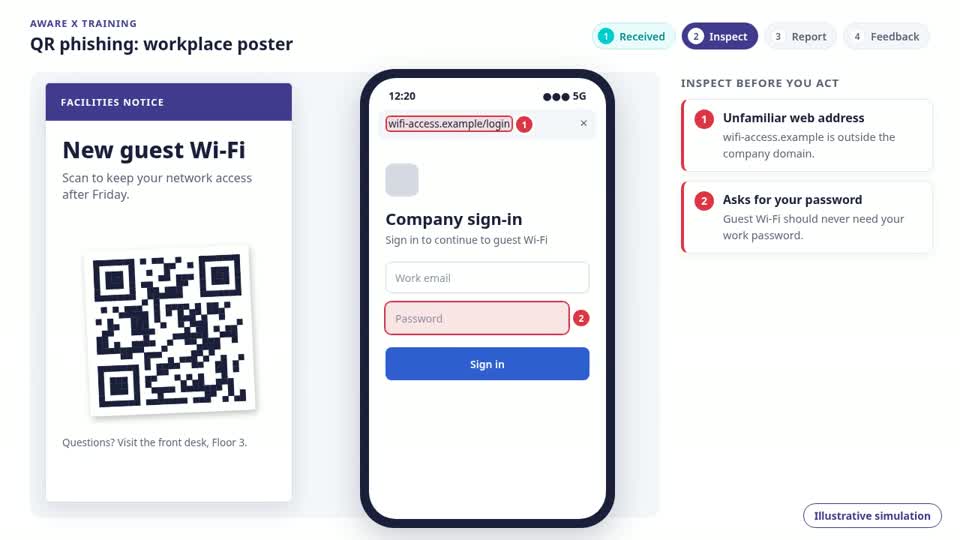
How to check a QR code before scanning
A QR code is just a link you cannot read. Before you trust one:
- Preview the destination: most phone cameras show the URL before opening it. Check the domain carefully.
- Look for tampering: a sticker over the original code on a sign, poster, or menu is a classic move.
- Be suspicious when a scan leads straight to a sign-in or payment page.
- For sensitive actions, type the official address or use the official app instead of the code.
Examples of quishing
Quishing works wherever a code feels routine:
- A sticker placed over the QR code on a parking sign leads to a lookalike payment page.
- An event agenda or office poster includes a swapped code that asks for your workspace credentials.
- An email avoids link scanners by putting the malicious link inside a QR code image.
Clarity before
the next step.
What does quishing mean?
Quishing means QR code phishing. An attacker hides a malicious link inside a QR code so you scan it without seeing where it leads.
Is a QR code safer than a link?
No. A QR code is another way to encode a link, and it is harder to inspect. A scan does not prove the destination is legitimate.
Can you train staff against quishing?
Yes. QR code phishing simulations place codes in believable material so teams practice previewing the destination before they trust it.