

The sender almost matches
Check the actual address and domain, not just the display name or logo.
Meet AwareX: business-context email simulations, human approval and coaching that turns a risky click into a learning moment.
Where we test
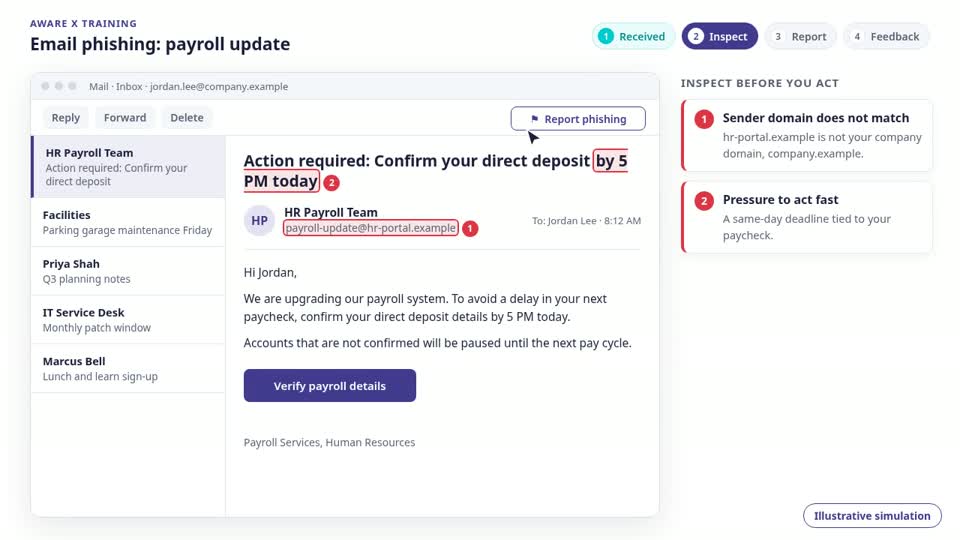
Phishing uses a deceptive email to persuade someone to reveal information, open an attachment or follow a harmful link. The message can look like a colleague, a supplier or a service your team already uses.
An email appears to come from a supplier. It asks accounts payable to update bank details before an invoice is paid. The branding looks familiar, but the reply address and account change have not been independently verified.
Check the actual address and domain, not just the display name or logo.
A deadline, suspended account or overdue invoice pressures someone to skip normal checks.
A link, attachment, or credential request takes the conversation somewhere it should not go.
Pause before opening attachments or entering credentials.
Verify the request through a known contact or a bookmarked service.
Report the message through your organization’s security process.
AwareX builds relevant email scenarios from business context and authorized information. Your team reviews the test; employee responses inform immediate coaching and the next learning cycle.
Discuss personalized email simulations, approval controls and campaign-linked coaching in your demo.
No. Correct logos, polished grammar and familiar business context do not prove that a request is legitimate. Independently verify sensitive actions.
The form is available to preview, but delivery is not yet connected. Submitting it does not send or save your details.